Sockets
Gems go into equipment and add properties to it. Socketing costs nothing - no gold, no tokens.
Where they come from
A socketable item arrives empty - what goes in it is your decision. They are the green-named ones.
- Wearables are bought with Epic Tokens in Castle Glendario, the epic zone.
- Weapons drop from raid bosses, and nowhere else.
- Gems come off level 40 raid bosses - corpses and chests - or are bought with Epic Tokens in Castle Glendario.
Gems live in a pool, not in your pack
A gem you pick up is absorbed: the item disappears and the gem is added to your pool, in the quantity the gem itself is worth. The pool belongs to the account, so every character on your key draws on the same gems, and a stack collected by one is usable by another.
Sockets on an item
How many sockets a piece of equipment has depends on what it is - between three and six, by base item type. Roughly half the base item types have no sockets at all.
All the copies of one gem share a single socket. Putting a second and a third of the same gem into an item does not use up another socket; it deepens the property. Each gem has its own ceiling for how many copies one item may hold, and the window will not take more:
| Gem | Copies one item takes |
|---|---|
| An ability score, AC, attack bonus, enhancement | 6 |
| A skill | 15 |
| A saving throw | 5 |
| Spell resistance | 17 |
| Mighty | 10 |
| A damage type, and massive criticals | 7 |
| Regeneration | 4 |
| A damage resistance | 2 - 5/- for the first, 10/- for the second |
| A bonus spell slot | 2 of the same level |
| Freedom, Haste, Keen, Knockdown, Power Attack, Holy Avenger, the extra ranged damages | 1 - these never stack |
Visual effect gems take no socket at all, and neither do the experience gems; they sit under the item's picture rather than in a slot. Visual gems go on melee weapons only.
The visual slot
Visual and experience gems sit in a slot of their own, and an item holds one of them at a time. Replacing it hands the old one back to your pool.
Finding your gems
Player Menu -> Player Tools -> View my Gems, or type -my_gems. The panel lists everything in the pool, and Materialize takes a gem back out of the pool and puts it in your inventory as an item again - which is how you trade one. Moving a gem into your vault does the opposite: it leaves the character and goes into the pool.
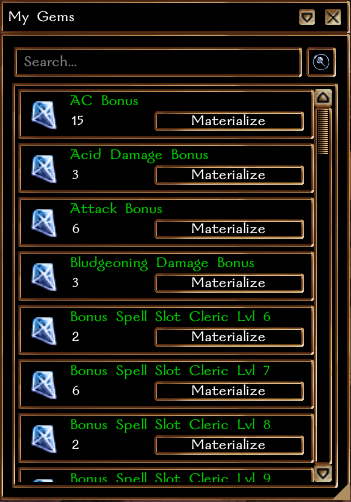
Opening the socket window
Three ways, all equivalent:
- equip the item and use its own power on yourself;
- Player Menu -> Work with this item -> Socket this item;
- type
-socketand click the item.
The window shows the item's slots, and the gems you could put in them on the left. + and - add and remove one; M fills a gem to its maximum in one go and 0 clears it.
While you are in there you can also add a tag of your own to the item's name - up to 32 characters - and change its icon, including on items the ordinary appearance editor will not touch.
Gems that take no socket slot - the visual and experience ones - are listed under the item's picture in the middle rather than against a slot.
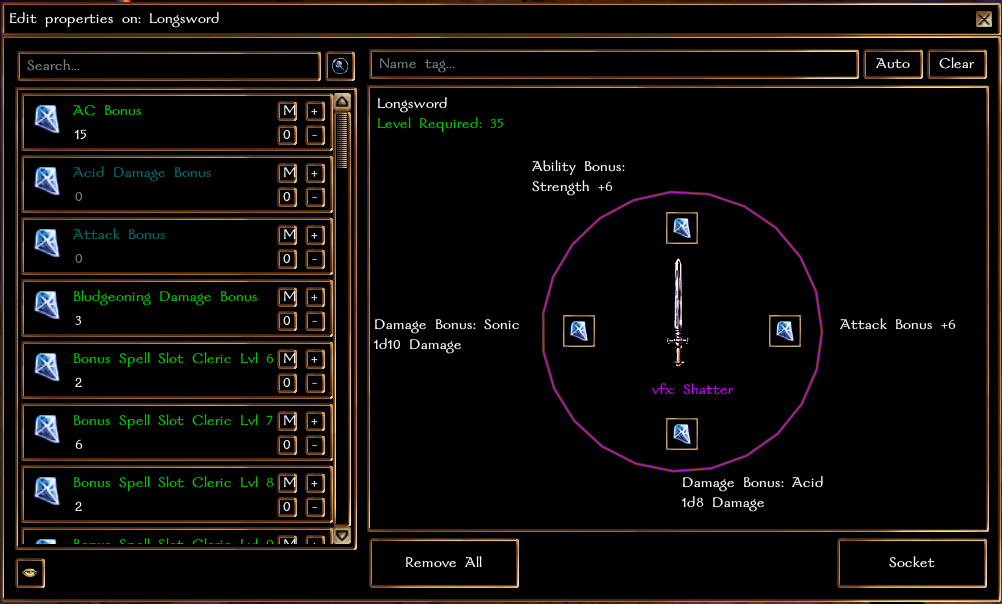
Working in the window
Changes are staged: nothing happens to the item until you press Socket, and closing the window throws away what you had lined up. Typing part of a gem's name filters the list as you type.