
Party Finder
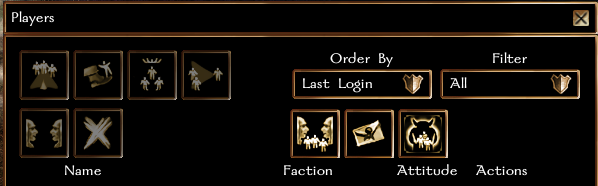
The Party Finder is a board of ads from players looking for a group, or for more members for the one they lead. It lives in the players list: press Open Party Finder there, and Players List to go back. The window stays where you put it.
Posting an ad
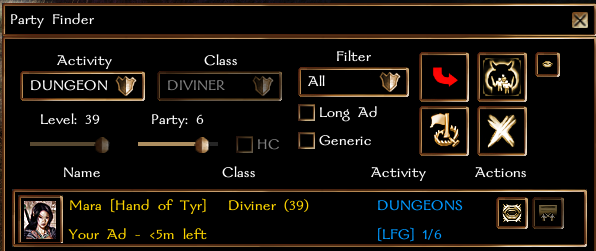
The controls at the top are filled in from your character when the finder opens. Press Post Ad, and your ad appears at the top of your list in a gold frame, and in everyone else's list.
| Control | What it sets |
|---|---|
| Activity | Raids, Dungeons, Leveling, World Boss, Social or Any |
| Class, Level, HC | your character's class group, level and Hardcore status |
| Party | the party size you are aiming for, from 2 to 6, or Any, which has no limit |
| Long Ad | keeps the ad up for 30 minutes instead of 5 |
| Generic | an ad for a character you are not playing right now - see below |
- The activity starts on Raids for a character at the level cap, and on Leveling otherwise.
- Class, level and Hardcore are your character's own and cannot be changed, except on a Generic ad. The class groups are the nine of the item sets: Archer, Agile, Fighter, Diviner, Arcanist, Support, Shifter, Tank and Warlock. Hardcore means a living Hardcore character.
- Default puts the controls back to your character's values, Post Ad posts your ad or updates it, and Remove Ad takes it down.
One ad per account. Only a party's leader can post one for the party, and an ad cannot be posted for a party that is already the size it asks for.
What an ad shows
Under the activity, an ad shows how big its party is and the size it aims for:
| Shown | Meaning |
|---|---|
[LFG] 1/6 | looking for a group: the owner is alone |
[LFM] 3/6 | looking for more: the owner leads a party of 3 |
[LFM] 3+ | a party with no size limit |
A +N more... button inside a party's ad shows the rest of the party.
Generic ads
A Generic ad is for a character you would log in on once a group is found. Tick Generic while you are not in a party, and choose the class group, level and Hardcore yourself. The class can also be Any Class, if you will bring whatever the group needs. The ad shows your account name instead of a character.
A Generic ad takes messages, not join requests, since the character it is about is not the one online.
How long an ad lasts
5 minutes, or 30 with Long Ad. Posting it again restarts the time. It comes down earlier:
- when your party reaches the size the ad aims for;
- when you join someone else's party, or hand the lead of your own to someone else;
- for a Generic ad, as soon as you join any party.
If you log out, the ad stays listed, greyed out, until its time runs out or you come back. Ads are not kept over a server restart.
Joining a party
Press the join button next to an ad to ask its owner to let you in, and press it again to withdraw. You can ask while you are not in a party, and you can ask several ads at once, a few seconds apart.
The button is greyed out, and its tooltip says why, when the owner is offline, the ad is Generic, you are already in that party or in another one, the owner declined you, or the two of you are hostile.
Joining any party withdraws every request you have open.
Answering requests
When someone asks to join you, you get a message, and the requests button next to Broadcast on your ad lights up; its tooltip says how many are waiting. It opens the list of who asked, with each player's:
- name, portrait and account name;
- level, race and effective character level, and every class with its levels;
- class group and Hardcore status;
- whether you are in experience range of each other - see Parties.
For each one you can message them, accept them into your party - you stay its leader - or decline them. A declined player cannot ask the same ad again.
Broadcast
The broadcast button on your own ad shouts it to the whole server, sends a notice to the players whose level fits, and posts it on our Discord.
- Alone, it notifies players alone and parties whose level fits yours, or the level of a Generic ad.
- Leading a party, it notifies players alone whose level fits your party.
Once every 5 minutes per account - logging in on another character does not reset it.
Finding people
The Filter at the top shows one activity at a time, and the boxes at the bottom count the ads for each. Use the buttons next to an ad to message its owner or ask to join.
The commands
The -lfp commands post an ad for an activity, keeping your other ad settings, and broadcast it at once. They share the broadcast's 5 minute wait.
| Command | Activity |
|---|---|
-lfp | Any |
-lfp_dungeons | Dungeons |
-lfp_level | Leveling |
-lfp_rp | Social |
A test character is never notified of an ad.