
Barter
Bartering is how two players trade items, gold and tokens directly, face to face. The game's own barter window is replaced by a window of the server's own.
Asking for a barter
Any of these sends a barter request to another player:
- Barter on the player's radial menu, or on your quickbar;
- dragging an item from your inventory onto them;
- dragging gold onto them.
Your character walks up to them first. They get a BARTER REQUEST window and have 60 seconds to accept. If they decline, you cannot ask them again for 30 seconds.
When a barter is refused:
- either of you is in combat, dead or dying, polymorphed, or in a battleground;
- either of you is already bartering, or answering another request;
- you are in different areas, or more than 10 metres apart;
- a test character can only barter with another test character.
The barter window
Each of you sees your own offer and the other player's, side by side.
- Gold and tokens are added from one picker, which lists only what you hold. If you spend some elsewhere while the window is open, your offer is lowered to what you still have.
- Add item picks an item from your inventory. Up to 50 items a side, counting what is inside a bag. A bag is traded with everything in it, listed under it.
- These cannot be offered: equipped items, cursed items, test items and battleground items.
- Item names longer than 32 characters are cut; hover one for the whole name, or examine it.
Temporary properties, such as a weapon enchanted by a spell, come off an item when it changes hands, so the barter window does not show them. Unidentified items stay unidentified.
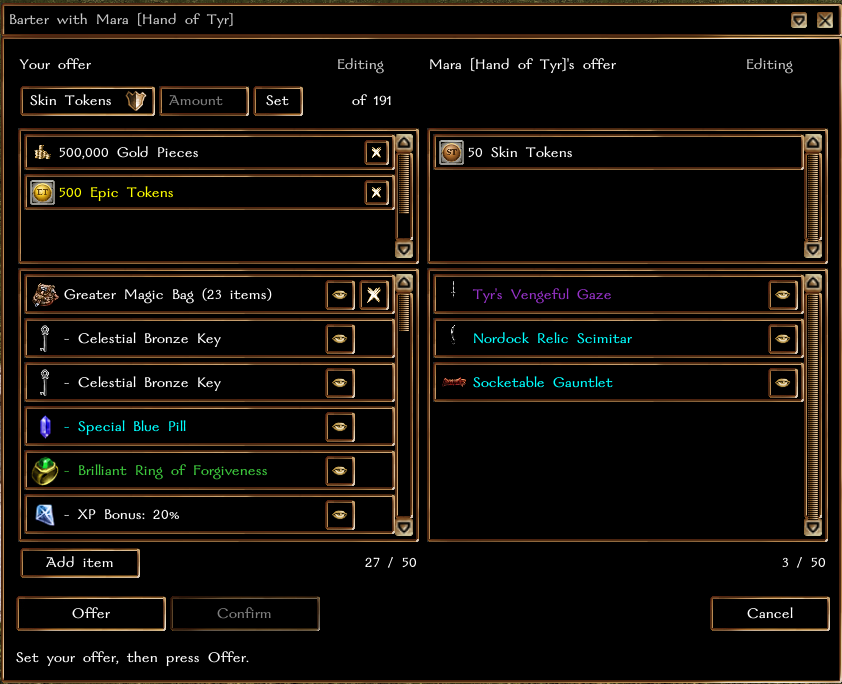
Offer and Confirm
Each side moves through three steps: Editing, Offered, Confirmed.
- Press Offer when your side is ready. To change it, press Withdraw offer first.
- Once both sides have offered, press Confirm.
- When both have confirmed, the trade is made.
Any change on either side cancels the other side's Confirm, and Confirm then waits 3 seconds before it can be pressed again, so nothing can be swapped in under the other player's click.
The trade is all or nothing. If anything fails, nothing changes hands. When it succeeds, both characters are saved at once, and each of you gets a message listing what you gave and what you received.
When it closes
A barter is cancelled when either of you presses Cancel or closes the window, when one of the refusals above becomes true - you move more than 10 metres apart, or a fight starts - or after 5 minutes with no change to either offer.
See also
- Trade post - selling to players who are not online
- Vault
- Tokens
- Interface